


Gaming gear can make a real difference to how you play, whether you’re competing in fast-paced shooters, exploring open-world adventures, or spending long hours at your computer. Razer has built a strong reputation in the gaming industry with performance-focused peripherals, distinctive designs, customizable RGB lighting, and premium gaming laptops.
But which Razer products deserve a place in your setup? The answer depends on your budget, preferred games, and the features you value most. Some gamers want a lightweight mouse with precise tracking, while others prioritize mechanical keyboard feedback, clear voice communication, or desktop-level performance in a portable laptop.
We’ve selected five popular Razer products and product families worth considering in 2026. This list focuses on practical benefits, notable features, and the trade-offs to consider before buying.
Editorial note: This is a curated selection of popular Razer products, not an independently verified ranking of current worldwide sales.
1. Razer DeathAdder Essential — Best Budget Gaming Mouse
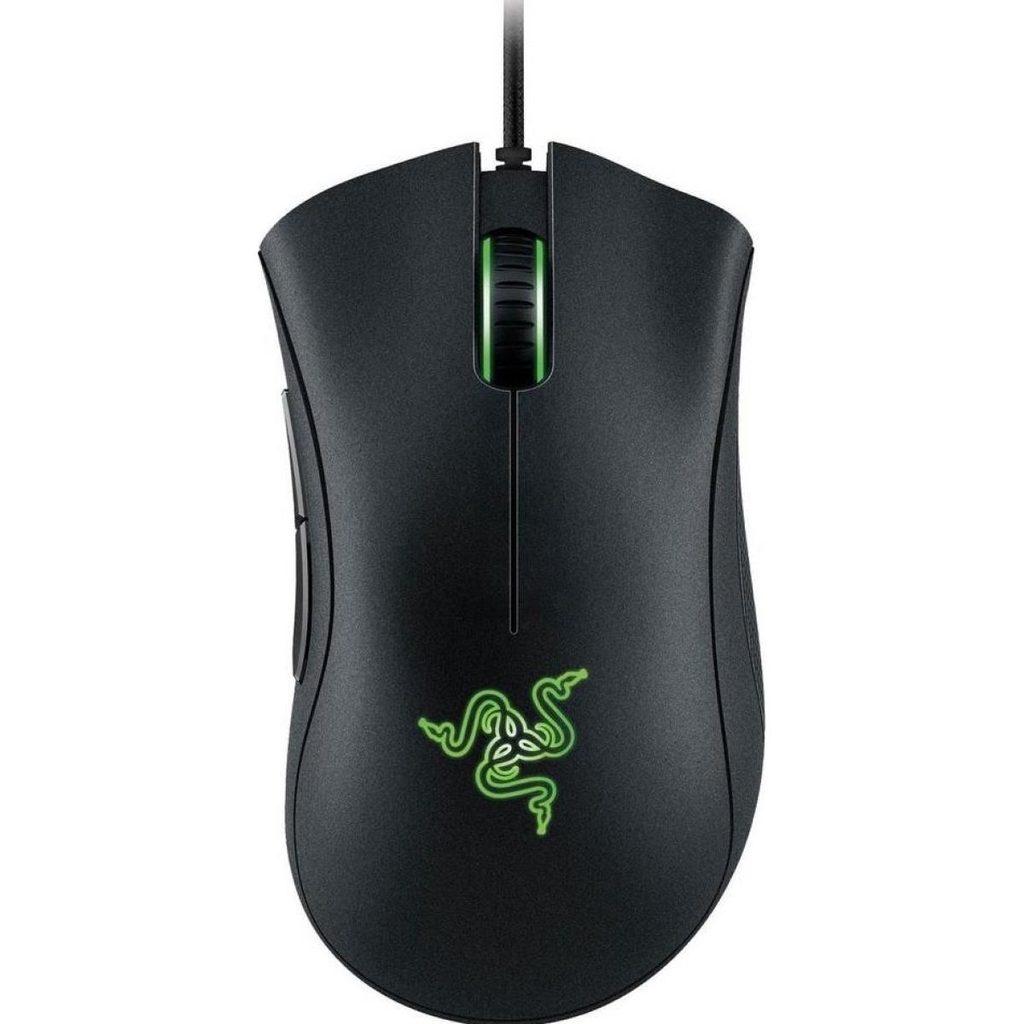
The Razer DeathAdder Essential is a sensible starting point for gamers who want a dependable mouse without paying for premium wireless technology. It belongs to the long-running DeathAdder family, known for its ergonomic shape and gaming-focused design.
Its right-handed form is designed to support comfortable handling during extended sessions. The mouse features a 6,400 DPI optical sensor and five programmable buttons, providing the essential controls needed for many PC games. Its wired connection also means you don’t have to worry about battery charging.
The DeathAdder Essential is particularly suitable for beginners, casual players, and anyone replacing a basic office mouse with a dedicated gaming model. While it lacks some of the advanced features found in higher-end Razer mice, it covers the fundamentals well.
Key features
- 6,400 DPI optical sensor
- Five programmable buttons
- Ergonomic right-handed design
- Wired USB connection
- Simple setup for compatible computers
Pros
- Generally more affordable than premium gaming mice
- Comfortable shape for many right-handed users
- No battery charging required
- Straightforward controls
Cons
- Wired design limits freedom of movement
- Fewer advanced features than premium models
- Shape may not suit every hand size or grip
Verdict: A practical budget choice for gamers who value comfort and basic performance over advanced extras.
2. Razer Basilisk V3 — Best for Customization
If you want more controls at your fingertips, the Razer Basilisk V3 is worth considering. This wired gaming mouse combines an ergonomic design with programmable buttons and an intelligent scroll wheel that supports different scrolling modes.
Its HyperScroll tilt wheel can switch between tactile scrolling and free-spinning movement, making it useful both in games and during everyday tasks. The mouse also includes 11 Razer Chroma RGB lighting zones, allowing you to customize its appearance and coordinate lighting with compatible devices.
The Basilisk V3 is particularly appealing to players who enjoy role-playing games, strategy titles, and other games that benefit from shortcuts. Its additional controls can also help with productivity applications.
However, its feature-rich design may be unnecessary for gamers who prefer a very lightweight mouse for competitive shooters. Since it is wired, it may also be less appealing to users who want a completely cable-free desk.
Key features
- 10+1 programmable buttons
- HyperScroll tilt wheel
- Razer Chroma RGB lighting
- Focus+ optical sensor
- Ergonomic right-handed shape
Pros
- Extensive button customization
- Flexible scroll-wheel modes
- Attractive RGB lighting
- Useful for gaming and productivity
Cons
- Wired connection
- More complex than basic gaming mice
- May feel bulky to users who prefer smaller mice
Verdict: A strong option for gamers who want versatility, customizable controls, and a distinctive desktop setup.
3. Razer BlackWidow V4 Series — Best Mechanical Gaming Keyboard
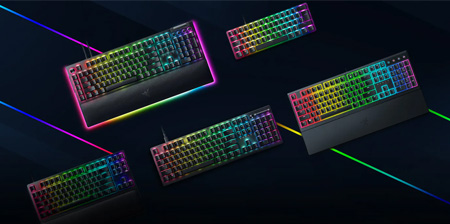
A mechanical keyboard can improve the feel of gaming and typing, and the Razer BlackWidow V4 series is designed for users who want a feature-rich desktop keyboard.
Depending on the model, the series offers mechanical switches, customizable RGB lighting, dedicated media controls, programmable keys, and other gaming-focused features. Certain versions also include a wrist rest and additional controls for managing media or adjusting settings.
Mechanical switches provide a more defined typing experience than many standard membrane keyboards. The exact sound, resistance, and feel depend on the switch configuration, so it’s worth checking the specific version before purchasing.
The BlackWidow V4 range includes different layouts and feature sets. Some models emphasize a full-size keyboard with a number pad, while others offer more compact arrangements to free up desk space.
Key features
- Mechanical switches
- Customizable RGB lighting
- Gaming-focused controls
- Programmable features on supported models
- Multiple layouts and configurations
Pros
- Distinct mechanical typing feel
- Customizable lighting effects
- Useful features for gaming and everyday typing
- Several configurations to choose from
Cons
- Often costs more than basic keyboards
- Mechanical switches can be noisy
- Features vary significantly by model
- Full-size versions occupy more desk space
Verdict: A worthwhile choice for gamers who want mechanical feedback and customization. Compare the exact model and switch type to find the best fit.
4. Razer BlackShark V2 X — Best Budget Gaming Headset
Audio and communication are important parts of multiplayer gaming. The Razer BlackShark V2 X offers a straightforward headset option for players who want an over-ear design and an integrated microphone without moving into the premium wireless category.
Its lightweight construction is intended to make long gaming sessions more comfortable. The microphone supports team communication, while the wired connection avoids charging requirements and makes setup relatively simple.
The BlackShark V2 X is suitable for compatible PCs and consoles, although connectivity and available features depend on the version. Buyers should confirm that the headset works with their preferred device before making a purchase.
It does not offer every feature found in more expensive headsets, such as premium wireless connectivity or advanced software options. For users who simply need a dedicated gaming headset, however, that may not matter.
Key features
- Over-ear headset design
- Integrated microphone
- Wired connectivity
- Gaming-focused audio
- Lightweight construction
Pros
- Straightforward setup
- No battery charging required
- Designed for extended gaming sessions
- Useful for multiplayer communication
Cons
- Wired connection can restrict movement
- Fewer premium features than higher-end headsets
- Platform compatibility should be checked
- Sound preferences vary from person to person
Verdict: A sensible option for gamers who want dedicated audio and voice communication at a more accessible price.
5. Razer Blade Gaming Laptops — Best Premium Portable Gaming Setup
For gamers who need performance beyond a desktop peripheral, the Razer Blade laptop family brings gaming hardware into a portable form factor. These laptops combine premium construction with powerful processors, dedicated graphics on gaming configurations, and displays designed for demanding applications.
Depending on the model, a Razer Blade laptop can support modern games, content creation, video editing, and streaming workflows. This makes the range appealing to users who want one computer for gaming and productivity.
Different configurations offer different screen sizes, graphics capabilities, memory, and storage. A higher-end configuration may suit demanding games and creative applications, while a smaller model may be preferable for users who travel frequently.
The primary drawback is cost. Razer Blade laptops typically occupy the premium segment, and powerful hardware can also generate heat and fan noise during demanding workloads. Comparing specifications is essential before choosing a model.
Key features
- Premium laptop construction
- Dedicated graphics on gaming models
- High-performance processor options
- Gaming-oriented display configurations
- Portable design for gaming and productivity
Pros
- Combines gaming and everyday computing
- Suitable for demanding creative workloads, depending on configuration
- Easier to transport than a desktop setup
- Premium design and build quality
Cons
- Typically expensive
- Performance and features vary by configuration
- Demanding workloads can generate heat and fan noise
- Less upgrade flexibility than many desktop PCs
Verdict: Best suited to gamers and creators who need a powerful portable computer and are comfortable paying a premium.
Razer Product Comparison Table
| Product | Best for | Main advantage | Main drawback |
|---|---|---|---|
| DeathAdder Essential | Budget gamers | Simple, ergonomic controls | Wired connection |
| Basilisk V3 | Customization | Programmable buttons and scroll wheel | Larger wired design |
| BlackWidow V4 series | Mechanical keyboard fans | Switch options and customization | Price and noise |
| BlackShark V2 X | Multiplayer gaming | Straightforward headset and microphone | Wired connection |
| Razer Blade laptops | Portable performance | Gaming and productivity in one device | Premium cost |
How to Choose the Right Razer Product
Before investing in Razer gaming gear, think about your everyday needs rather than choosing based on appearance alone.
Consider your budget. An entry-level mouse or headset may improve your setup without requiring a major investment. Premium peripherals and laptops make more sense when their additional features are genuinely useful.
Prioritize comfort. Mouse shape, keyboard layout, headset fit, and laptop weight can affect your experience during long sessions. If possible, try a device before buying it.
Check compatibility. Confirm operating-system support, connection types, and console compatibility. Features can vary across product versions.
Choose features you will use. RGB lighting and extra programmable controls can be appealing, but sensor performance, comfort, audio quality, and reliability should remain priorities.
Compare the exact model. Razer often sells several products under the same family name. Specifications, included accessories, and prices can vary considerably.
Final Verdict
Razer offers gaming products for different needs, from affordable accessories to premium portable computers. The DeathAdder Essential is a straightforward entry-level mouse, while the Basilisk V3 provides more controls for gamers who enjoy customization. The BlackWidow V4 series is a strong candidate for mechanical keyboard enthusiasts, and the BlackShark V2 X covers the basics of gaming audio. For users who need high performance on the move, the Razer Blade family offers a premium all-in-one solution.
There is no single best Razer product for everyone. The right choice depends on your preferred games, comfort, budget, and setup. Focus on the features that will make a practical difference, compare specific model versions, and choose gear that supports the way you actually play.


